Performance Reporting


Today we’re sharing some updates made to reporting that make it both blazing fast, and completely customizable.
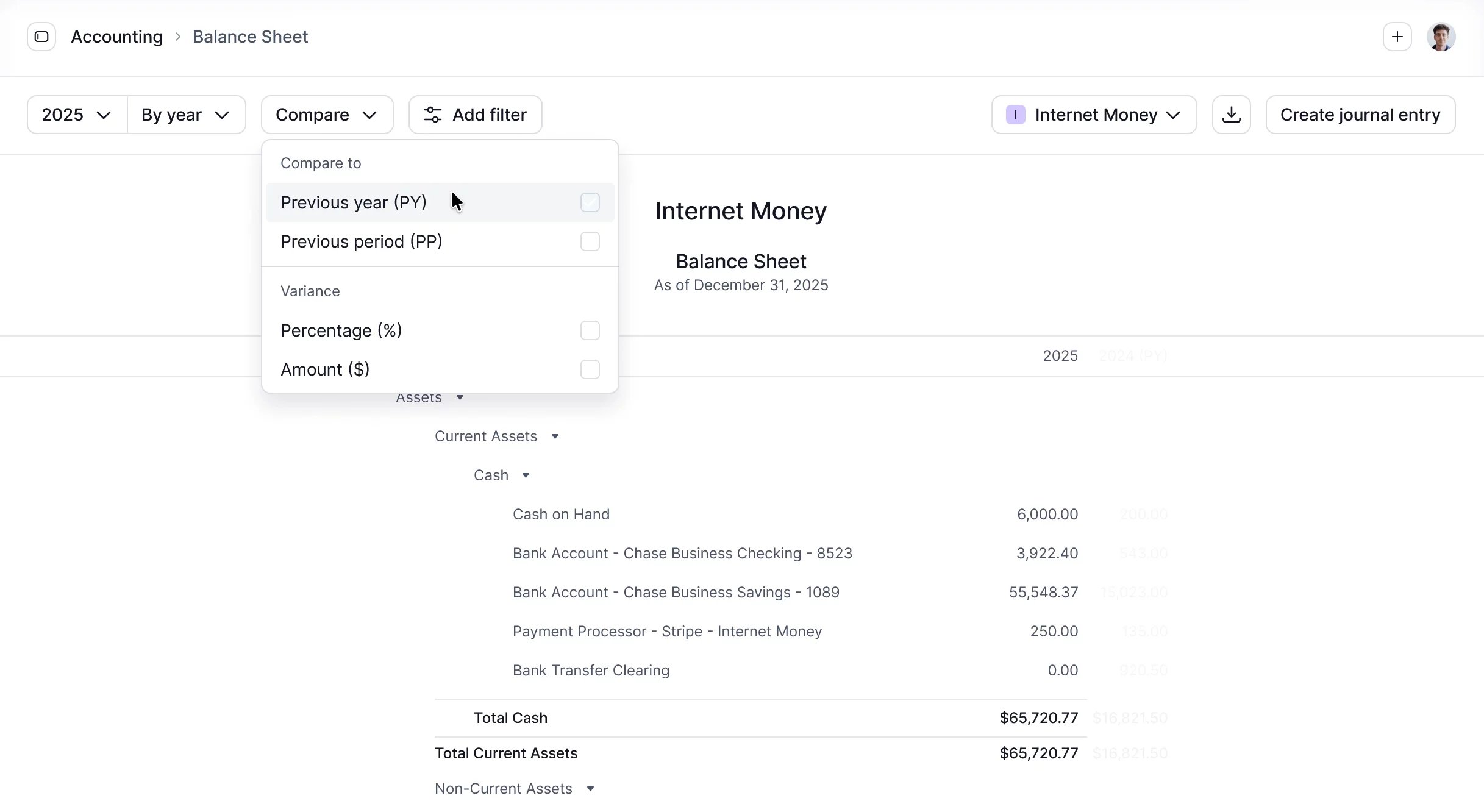
Getting a custom view of your reports can often feel slow and unintuitive in other accounting systems.
To solve this, we’ve engineered Kick reporting to feel nearly instant — even when you’re slicing, comparing, and changing views.
Customizable columns
Run your reports with columns broken out by:
- Class or Subclass, to see performance across locations, projects, departments, or any custom segment side-by-side
- Entity, if you’re managing multiple businesses and want a consolidated view in one report
Expenses by Vendor
A new report that shows your spending broken out by vendor across any period. Spot expense trends, flag anomalies for your clients, or use it to eliminate unnecessary spending for your own business.
Custom periods
View any report by month, quarter, year or across all time. Pick the period that matches how you actually run your business.
Compare to previous periods
Toggle on “Compare to” for all your reports to pull in a previous period alongside your current one. See the dollar and percentage change between periods at a glance.
To start customizing, head to the Accounting tab.
Multi-Entity Chart of Accounts
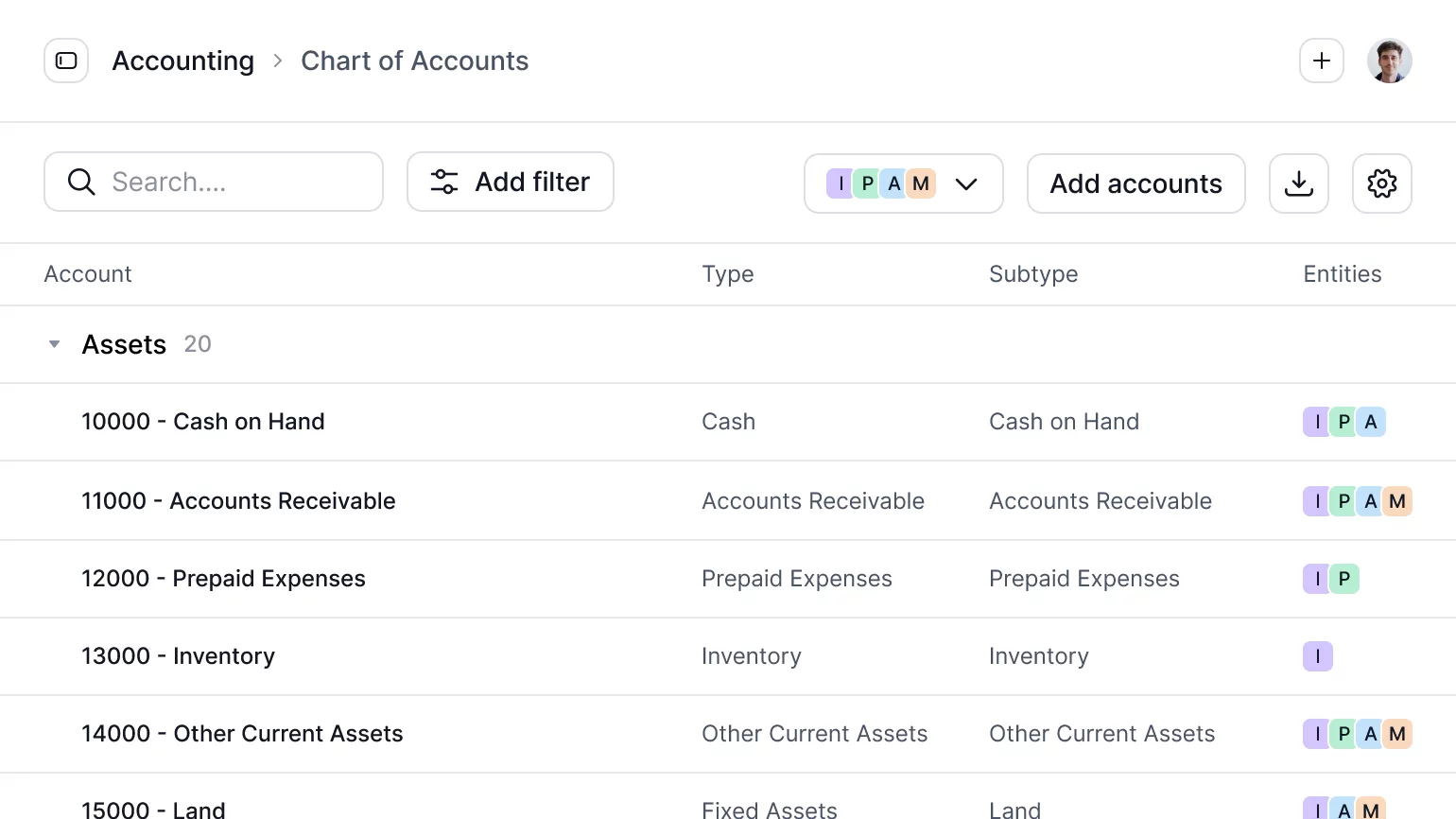
You can now create and manage your Chart of Accounts across entities in one place.
If you or your clients are running multiple businesses, keeping your Chart of Accounts consistent everywhere is harder than it should be.
With multi-entity Chart of Accounts, that’s no longer the case:
- Create and manage accounts for multiple entities at once
- See which accounts are shared across entities or specific to one, at a glance
- Keep your By Entity Profit & Loss and Balance Sheet reports clean and consistent
To get started, head to the Accounting tab and open your Chart of Accounts.
Improvements
- Collapse and expand on General Ledger: Collapse or expand all account sections at once. Accounts with many transactions auto-collapse by default for a cleaner view.
- Account type labels: The Accounts tab now shows the account type (credit card, bank, payment processor, etc.) at a glance.
- Opening balance adjustments: Added support for opening balance adjustment entries to true-up incorrect balances without affecting historical financials.
- Concurrent operation safety: Improved handling of simultaneous operations (e.g., Plaid syncing while merging accounts) to prevent race conditions that could leave data in an inconsistent state.
- Counterparty column: Added to manual journal entry creation as well as the General Ledger for all transaction-generated journal entries.
- PayPal foreign currency support: For transactions involving currency conversion, the original currency and amount are now stored and visible in transaction details.
- Amount filter on General Ledger: Narrow down entries by dollar value directly from the report.
- Change transaction class from journal entry drawer: Update a transaction's class directly from the drawer without navigating away.
- Create new GL account or counterparty during journal entry creation: Add new accounts or counterparties inline.
- Tasks digest email: Surfaces open and overdue tasks in your account so nothing falls through the cracks.
- Improved sync reliability: Reduced gaps and edge cases for Plaid and Stripe transactions to prevent missed or duplicated entries.
- Automated report width: Reports with a single column of data now automatically adjust to a set maximum width.
Fixes
- Journal entries left behind after account deletion: When a financial account was deleted, ghost records were left behind causing balance sheet errors. Both sides of each entry are now removed together.
- Opening balance import: The system was allowing accounts to be imported under the wrong classification (e.g., an expense account filed under income). Validation is now enforced.
- Mercury statement filenames: Mercury bank statement files were losing their ".pdf" extension during import, causing the reconciliation tool to reject them. Fixed.
- Statement navigation jumping to wrong document: When the document list was sorted, clicking next/previous would jump to the wrong document. Navigation now follows the sorted order correctly.
- Dismissed errors reappearing: Dismissing a warning in the importer would sometimes cause it to reappear on revalidation, and occasionally crash. Dismissed errors are now tracked and won't reappear.
- Bulk transaction updates missing account information: When updating multiple transactions at once, account details and entity weren't included in the update, resulting in incomplete records. Fixed.
- New connection sync failure: Certain newly connected Plaid accounts were failing to sync on the first attempt. Fixed.
- Bookkeeping slowdowns under load: When multiple transactions were being processed simultaneously, they could get stuck waiting on each other, causing stalls. Fixed.
- "Other Entities" showing in accounting settings: A placeholder entity was incorrectly appearing in accounting settings. It has been removed.
- Ledger not found error: In certain edge cases, the system was throwing a "ledger not found" error causing 500 errors for affected users. Fixed.
- Date input garbling digits: Typing a year into a date picker could produce garbled results (e.g., "2024" becoming "0202"). Year entry now works correctly.
- Dropdown selections lost in modals and drawers: Clicking a dropdown option inside a modal or drawer would sometimes fail to register. Selection now works correctly in all contexts.
- Modal overlays in nested drawers: Opening a modal from inside a drawer now correctly shows the background overlay. Previously it was missing in nested contexts.
- Account merge returning wrong account: After merging two accounts, the API was returning the deleted account, causing the UI to show stale information. The correct merged account is now returned.
- Entity access unnecessarily restricted to admins: Certain screens were filtering entities to only show those the user was an admin of, even when that restriction wasn't needed. Fixed.
- Dropdown selectors collapsed height when empty: Dropdown selectors would shrink to near-zero height when no value was selected, making them hard to click. They now maintain a consistent height.
AI
- Bulk Chart of Accounts import: Upload an existing Chart of Accounts from any accounting system. Accounts are mapped to the Kick CoA structure for you to review and accept.
- Transaction categorization: Better handling of ambiguous transactions that could fit multiple categories, with updated model prompting and evaluation.
- Improved confidence scoring: Better at distinguishing high-confidence predictions (auto-applied) from ambiguous ones (flagged for review).
- Better handling of incomplete data: Previously a single null field could discard an entire statement extraction batch. The system now skips only invalid rows and processes the rest.
- Transaction enrichment: Faster batching and enrichment, particularly for high-volume workspaces. The enrichment process is now safely retriable without risk of duplicate records or inconsistent state.
- PDF parsing: Fixed incorrect text extraction for PDFs using Symbol or ZapfDingbats font encodings.
- Extended processing timeout: Document extraction timeout increased from 3 to 5 minutes to prevent failures during large uploads.