Journal entry editor


We’ve updated our journal entry feature into a more powerful editor experience.
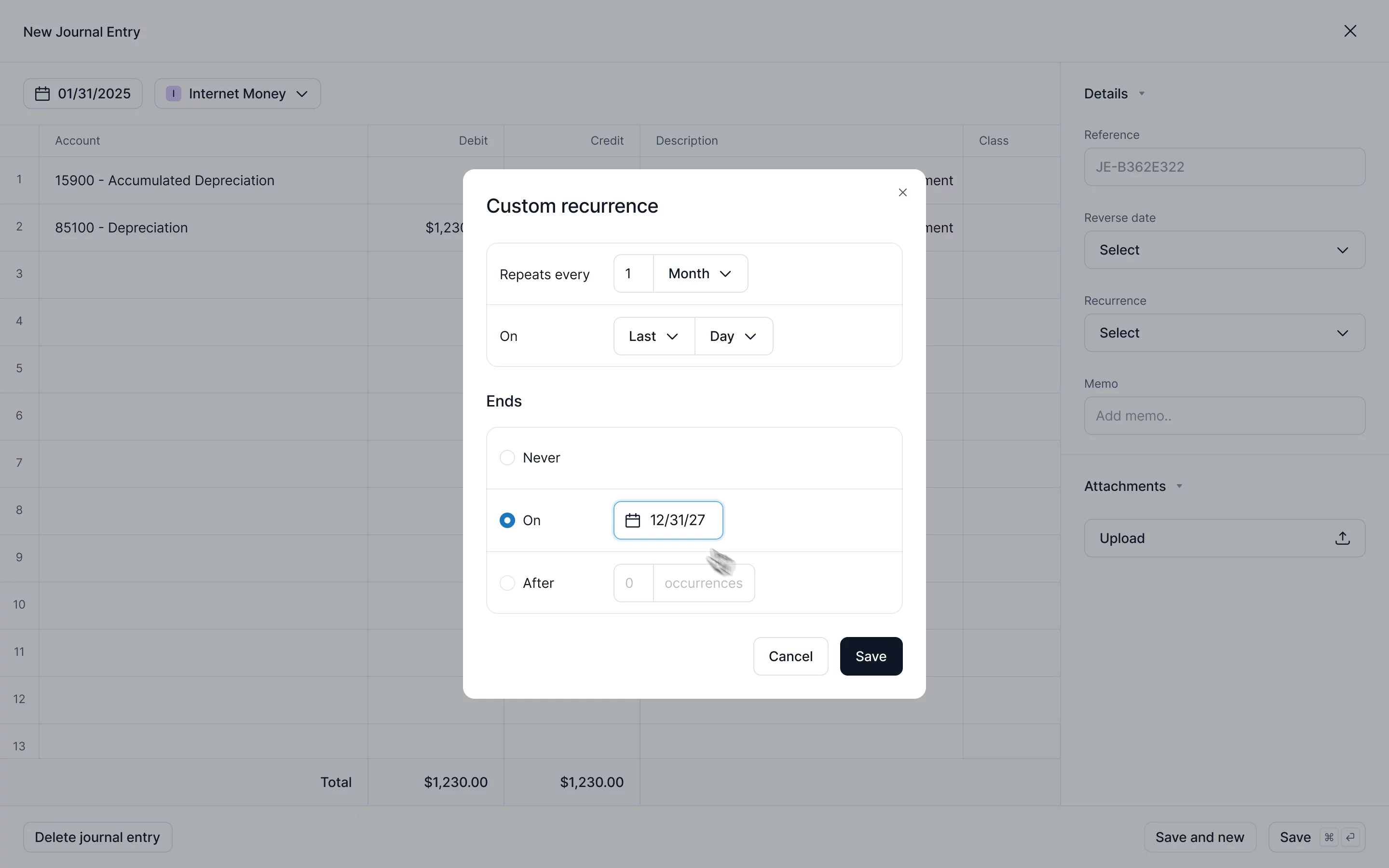
Recurring journal entries
Recurring journal entries help automate common accrual workflows like:
- Depreciation and amortization
- Deferred revenue
- Prepaid expenses
- Payroll adjustments
- …or any other recurring entry you never want to recreate again
You can also start a recurring journal entry in prior periods, which is especially valuable for catch-up bookkeeping.
Set the recurrence schedule once and Kick will generate each entry automatically.
Automated reversals
This feature is most useful for temporary accruals and month-end adjustments. Select a reversal date when creating the entry and Kick will generate the reversal for you.
Spreadsheet UI
We’ve updated the journal entry editor so it feels like a spreadsheet you’re familiar with. You can:
- Perform in-cell calculations
- Drag to fill Amounts, Descriptions, or Classes
- Undo, copy and paste, and navigate with keyboard shortcuts
- Calculate balancing entries for complex journal entries
This lets you handle all calculations in one place, without needing an offline spreadsheet.
To get started, head to the Accounting tab and click Create journal entry.